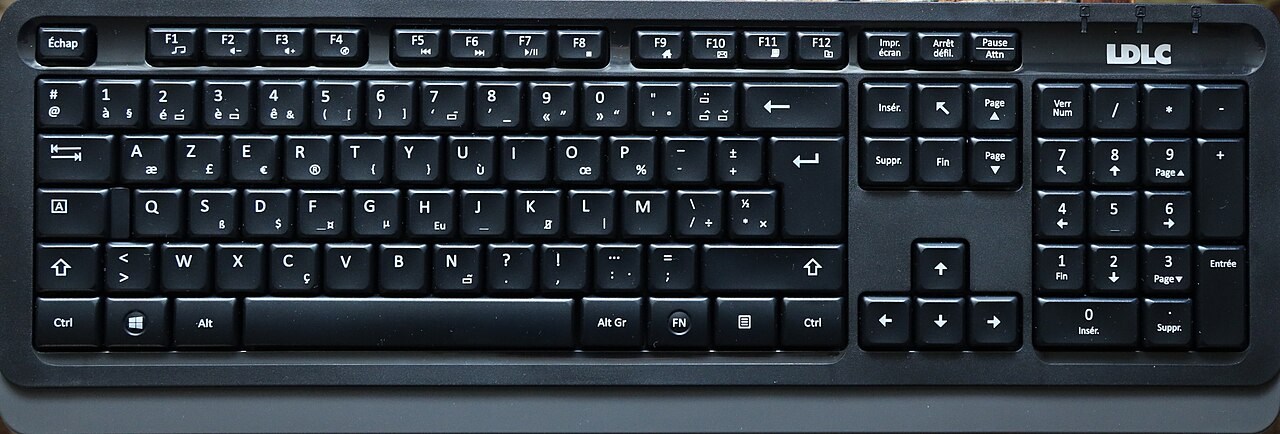
Look beyond QWERTY or AZERTY
The first letters in the top row do not describe the entire keyboard. Enter shape, Shift length, punctuation positions and the arrangement around the number row can differ between regional layouts. Compare a clear photograph of the exact variant being sold with the keyboard you already use. A listing with several selectable languages may show only one generic picture.
Make a note of the characters you type most: quotation marks, the euro sign, brackets or accented letters. Someone entering code, writing in several languages or filling spreadsheets may notice different inconveniences. A familiar arrangement is not automatically the only good choice, but changing it creates a learning task that should be deliberate.
Separate the hardware from the setting
The operating system's input layout determines what key presses produce. Changing that setting does not move the printed legends or change the shape of Enter. It also need not change the language of the operating system's menus. If the wrong character appears, check the selected input layout before concluding that the keyboard is defective.
On a shared computer, several layouts may be installed. Learn how to identify the active one and how switching is triggered. An accidental shortcut can make punctuation behave differently while ordinary letters still seem correct. For a new keyboard, test a short sample containing the symbols you rely on rather than only typing your name.
Check operating-system controls
Windows and Mac arrangements use different modifier labels and may place familiar functions differently. Some keyboards offer a switch or alternate keycaps, while others rely on software. Check which features work without installing anything, particularly on a managed work computer. A key bearing two symbols does not guarantee every shortcut behaves identically on both systems.
Function keys may prioritise media controls or traditional F-key commands. If you use F-keys frequently, find out whether that behaviour can be changed and whether the preference survives reconnection. A keyboard can be excellent for typing paragraphs yet frustrating in an application that depends on frequent combinations.
Keep replacement parts in mind
If you intend to change keycaps, regional legends are only part of compatibility. Key widths, stabilised keys and switch attachments also matter. A replacement set advertised for a general layout may omit the particular short Shift or unusual spacebar your board uses. Check a complete key diagram rather than buying by colour.
For ordinary office use, there is no need to plan a modification project unless you want one. The point is to avoid accidentally choosing an uncommon variant because it is the first item in a marketplace dropdown. Confirm the language and model code on the order summary.
Try your actual work
Before retiring the old keyboard, type a paragraph, use your common shortcuts and enter numbers in a familiar document. Check whether your hands find the navigation keys without repeated looking. Keep the trial within the seller's return conditions and allow some learning time if the change was intentional.
A suitable layout lets you reach the characters and commands you need with an acceptable amount of adjustment. Decide that from your work, not from a claim that one regional arrangement is universally faster.